


Theo: Prayer & Meditation
4.076.00 Reviews
App Specs
- Version
- 1.0.26
- Updated On
- License
- Free
- Downloads
- 500,000+
- Developer
- Familify® – Kids Sleep, Spiritual & Mental Health
- Categories
- Parenting
- Platform
- Android
Screenshots




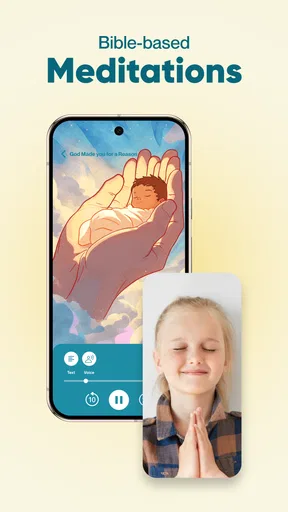



 Analysis by AppCompare
When I’m weighing a parenting app that also touches prayer and meditation, I look beyond whether its tone feels soothing. I want to know what kind of routine it encourages, whether it leaves room for a family’s own beliefs, and how much personal information I’m comfortable sharing. Theo: Prayer & Meditation brings affirmations, stories, and Bible-focused material together under the Theo name, so it is best approached as a faith-oriented resource rather than a general-purpose mindfulness tool.
A faith-centred option for family routines
Theo is a free parenting app from Familify® – Kids Sleep, Spiritual & Mental Health. It has an Everyone age rating, and its average rating is 4.0 from 575 ratings, with 59 written reviews. It has passed 500K+ installs. Those figures suggest it has found an audience, but they can’t tell me whether its religious framing suits a particular household; that comes down to the content and the choices a parent makes about using it.
The key distinction is that Theo’s focus is not simply helping a child settle or giving a parent a neutral breathing exercise. Its mix of affirmations, stories, and Bible material places spiritual reflection at the centre. That can make it a natural fit for families who already want faith to be part of everyday conversation. If you’re looking for secular sleep sounds, clinical mental-health support, or a broad meditation library without religious content, a different kind of app is likely to be a better starting point.
What to check before making it a habit
I’d begin by exploring the material together rather than handing the app to a child and assuming every item will suit them. A parent can listen to a story or read an affirmation first, then decide whether its language and message fit the child’s age, temperament, and family practice. This small step is especially useful when children interpret spiritual ideas literally or have questions that need a conversation rather than a screen-based answer.
Before sharing anything personal, I would also pause at the points where an app asks for information, account details, or a contribution. The version available is 1.0.20, and in-app purchases range from $14.99 to $59.99 per item. The app is free to start, but those purchases make it sensible to check what is being offered and who would be making the decision on a shared family device. I would treat any account or payment prompt as a moment to review the screen, not as a reason to rush through setup.
Fit matters more than a calming first impression
For a family that wants explicitly Christian material, Theo may offer a convenient prompt for a short shared pause: a story before bed, an affirmation at breakfast, or a prayer at a time when a child is asking questions. I would keep the activity brief and let the child respond in their own words. The useful part is not completing a streak or following a rigid script; it is using a piece of content to make room for a gentle conversation.
That same approach also makes the app easier to assess. Notice whether a child feels comforted, curious, bored, or uneasy, and adjust accordingly. If a story leads to a question a parent cannot answer, there is no need to force the session to a tidy conclusion. A trusted faith leader, caregiver, or age-appropriate book may be more helpful for that conversation than another screen session.
Worth Reading Before You Choose

EA SPORTS FC Mobile 26 Is a Bigger Football Game, but It Takes Time

Flipboard Shows What News Apps Must Do Beyond the Feed

Switching to Android Auto Means Rethinking Your Driving Routine

Google Calendar Makes a Crowded Week Easier to Manage

Ludo King Makes the Most of the Minutes Between Plans

Baby Panda World Brings Quick Play to Modern Phones, but Its Game Library Feels Busy
Getting Started with Theo
First things first, downloading Theo: Prayer & Meditation was a breeze. Available on both Android and iOS, it took mere seconds to install. The app welcomes you with a serene and visually pleasing interface, setting the tone for what’s to come. It's like stepping into a virtual zen garden, minus the pesky bugs.
Creating an account is as simple as pie, requiring just basic info. Once you're in, the app offers a quick tour to familiarize you with its features. I loved how it didn’t overload me with information right off the bat. It's straightforward, allowing you to dive into the experience almost immediately.
Exploring the Features
Now, let's get to the heart of it. Theo boasts a variety of guided meditations and prayers tailored to suit different needs. Whether you're looking to reduce stress, find gratitude, or just need a moment to breathe, there's something here for you.
- Guided Meditations: These are wonderfully narrated, with calming voices that guide you gently through each session. The meditations vary in length, so whether you have 5 minutes or 30, you'll find a session that fits.
- Prayer Sessions: For those looking to deepen their spiritual practice, Theo offers beautifully crafted prayers that resonate on a personal level. It's like having a pocket-sized spiritual mentor.
- Daily Inspirations: Each day, the app serves up a new dose of inspiration. These quotes and reflections are a lovely way to start the day on a positive note.
One of my favorite features is the ability to bookmark sessions. Found a meditation that really hit the spot? Just bookmark it for easy access later. It's these little touches that make Theo feel like a personalized experience.
Making the content work in real life
A practical way to use the material is to pick one moment that already exists in the family routine instead of trying to create a new habit from scratch. For example, a parent could preview a short item after dinner, then save a suitable session for a quieter part of the evening. If a child enjoys it, the saved item is easier to revisit; if it does not land, the family can move on without turning a spiritual activity into homework.
Bookmarks are particularly useful for that kind of low-pressure trial. I would use them as a small, parent-curated shortlist rather than collecting every appealing session. A few familiar choices can reduce decision-making when everyone is tired, while periodically reviewing the list helps avoid repeating something that has stopped feeling useful. This is also a simple way to keep the child’s preferences in view without assuming that one style of prayer or meditation will work every day.
Compared with a generic meditation app, the appeal here is the combination of spiritual material and family-oriented use. A broad mindfulness service may offer more neutral exercises or a wider range of relaxation techniques, while a children’s bedtime app may concentrate more narrowly on sleep. Theo’s faith-based emphasis is its defining trade-off: it can feel more relevant to a family seeking Bible-related reflection, but less adaptable for mixed-belief homes or parents who want content that does not assume a religious framework.
User Experience and Design
The design of Theo is minimalistic yet elegant. The developers clearly understand that simplicity is key when you're aiming to relax. Navigation is intuitive, with everything you need just a tap away. Plus, the soothing color palette is easy on the eyes, enhancing the overall calming effect.
Another notable aspect is the app's performance. I didn't encounter any glitches or crashes, which can be a deal-breaker for many users. Theo runs smoothly, allowing you to focus on what truly matters: finding your inner peace.
Privacy, purchases, and family control
For a parenting app, trust is not only about a reassuring design. It also means paying attention to what a screen asks a parent or child to do. I would read account prompts carefully, avoid entering a child’s personal details unless they are genuinely needed for the family’s use, and keep purchase decisions with an adult. Those are sensible habits for any app used around children, especially when a free starting point sits alongside paid items.
The clearest user control described in the experience here is the ability to bookmark sessions, which helps a parent choose what to return to. I would not treat that as a substitute for parental judgement: preview content, decide whether the religious language fits, and stay nearby if a child wants to discuss what they heard. For families who share a device, an adult can also make a deliberate choice about when the app is available rather than leaving every decision to a young user.
That cautious approach is not a criticism of Theo’s purpose; it is part of using any child-facing spiritual material responsibly. A calming presentation can make content feel universally suitable when it may not be. The best test is whether a particular story, affirmation, or prayer feels right for your family, not whether it has a polished interface or a high number of installs.
The Community Aspect
One feature that sets Theo apart is its community aspect. The app fosters a sense of belonging with its Community Prayers section, where users can share their own prayers and intentions. Reading through these can be quite moving, reminding us that we’re all in this together. It's a comforting thought, especially in today's fast-paced world.
When a different choice makes more sense
I would skip Theo if I wanted a strictly secular tool, professional counselling, or an app whose main purpose is to address a child’s sleep or mental-health concern. A prayer or meditation can be a comforting part of a routine, but it should not stand in for appropriate support when a child is struggling. Likewise, families with different religious traditions may prefer a resource that lets them choose from a broader range of perspectives, rather than making Bible-centred content the starting point.
It may also be a poor fit for a household that wants a completely hands-off children’s app. The more personal the subject, the more valuable it is for an adult to decide what is appropriate and to talk with the child afterward. If that involvement feels like too much for your routine, a simple printed bedtime story or a parent-led quiet moment could be easier and more predictable.
Final Thoughts
So, is Theo worth your time? In my book, absolutely. It's more than just an app; it's a tool for personal growth and spiritual connection. Whether you're a meditation newbie or a seasoned pro, Theo offers something valuable for everyone.
While no app can replace real-life spiritual guidance, Theo does a stellar job of complementing your journey. It's a convenient way to incorporate mindfulness and prayer into your daily routine, wherever you are.
If you're ready to embark on a journey towards inner peace, give Theo a try. Who knows? It might just become your new favorite companion on this path we call life. Happy meditating!
My recommendation is more specific than “it works for everyone”: I’d try it when a family is actively looking for faith-centred stories and reflection, and I’d involve a parent in choosing what becomes part of the routine. The free entry point makes it approachable, while the paid items are a reason to review purchases deliberately. If the religious emphasis and family role suit your household, Theo can be a useful prompt for shared quiet time; if they do not, another option will serve you better.
Pros
- User-friendly interface enhances experience.
- Wide range of guided meditations available.
- Personalized prayer reminders.
- Offline mode for uninterrupted sessions.
- Calming background sounds included.
Cons
- Limited free content access.
- No community interaction features.
- Subscription can be pricey.
- Occasional app crashes reported.
- Customization options are limited.
FAQs for Theo: Prayer & Meditation
What are the main features of Theo: Prayer & Meditation?
Theo: Prayer & Meditation offers a variety of features designed to enhance your spiritual practice. These include guided prayers, daily devotionals, meditation timers, and customizable reminders. The app also provides a community forum for sharing experiences and insights. Additionally, users can track their progress and set personal goals to deepen their spiritual journey.
Is Theo: Prayer & Meditation suitable for beginners?
Yes, Theo: Prayer & Meditation is designed to be accessible for users at all levels, including beginners. The app offers introductory guides and tutorials to help new users get started with prayer and meditation. It also provides a range of difficulty levels for meditations and prayers, ensuring that everyone can find a suitable starting point.
Does Theo: Prayer & Meditation require an internet connection?
While an internet connection is necessary for initial setup and downloading new content, Theo: Prayer & Meditation offers offline access to downloaded prayers and meditations. This feature allows users to engage with the app's content anytime and anywhere, without worrying about connectivity issues.
Is there a subscription fee for Theo: Prayer & Meditation?
Theo: Prayer & Meditation offers a free version with basic features, but also provides a premium subscription that unlocks additional content and features. The premium version includes exclusive guided meditations, extended prayer libraries, and advanced tracking capabilities. Users can choose a monthly or annual subscription based on their needs.
How does Theo: Prayer & Meditation support community interaction?
Theo: Prayer & Meditation fosters community interaction through its built-in forum and sharing features. Users can connect with others to share experiences, insights, and support. The app also organizes virtual events and group meditation sessions, allowing users to participate in a global community focused on spiritual growth.


